Transcribe by ExecuteFree on iPhone

The private AI note taker for lawyers.

Tap record. A few minutes after the meeting ends, your notes and the full transcript are in your inbox.

Coming soon to theApp Store

One email when it's in the App Store.

Tap recordWhen the meeting starts

Get your notesWritten by AI, emailed minutes later

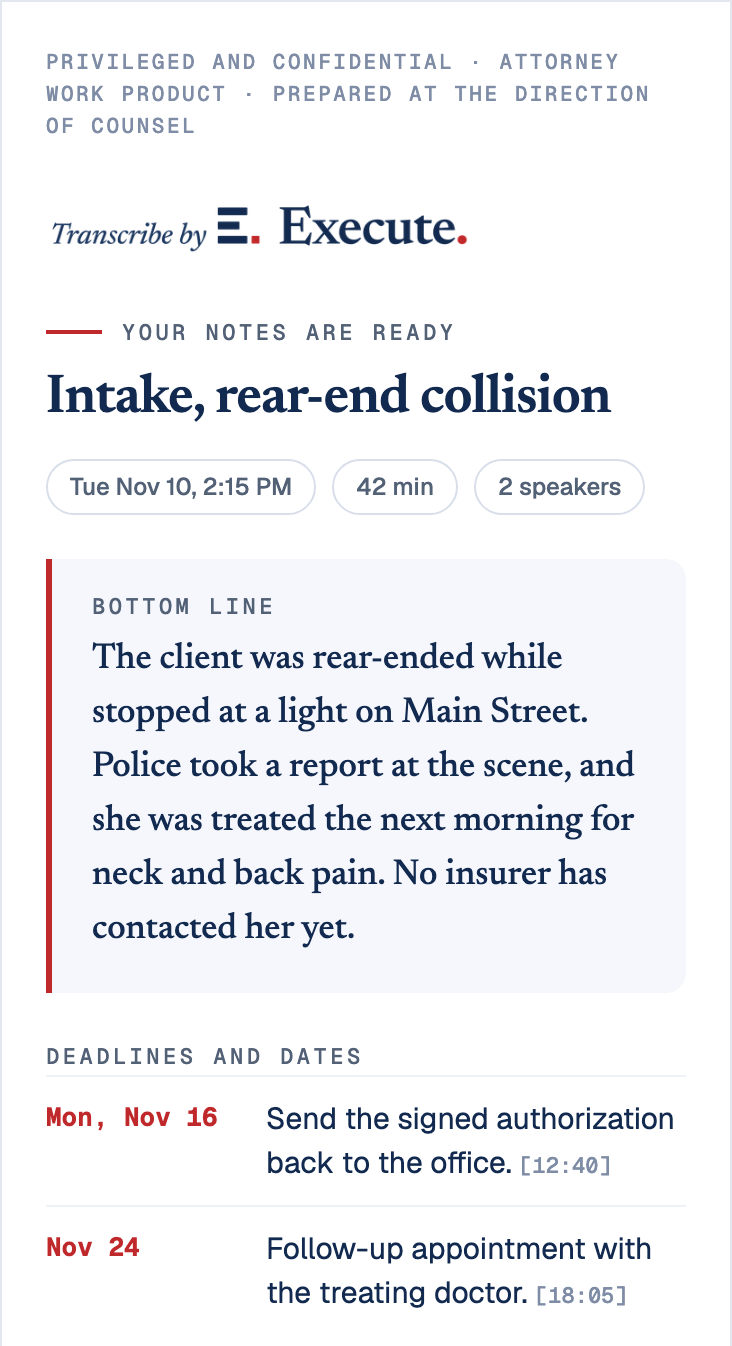
The notes email. Your notes are ready: Intake, rear-end collision. Tue Nov 10, 2:15 PM, 42 min, 2 speakers. Bottom line: the client was rear-ended while stopped at a light on Main Street. Deadlines and dates: Mon, Nov 16, send the signed authorization back to the office; Nov 24, follow-up appointment with the treating doctor.
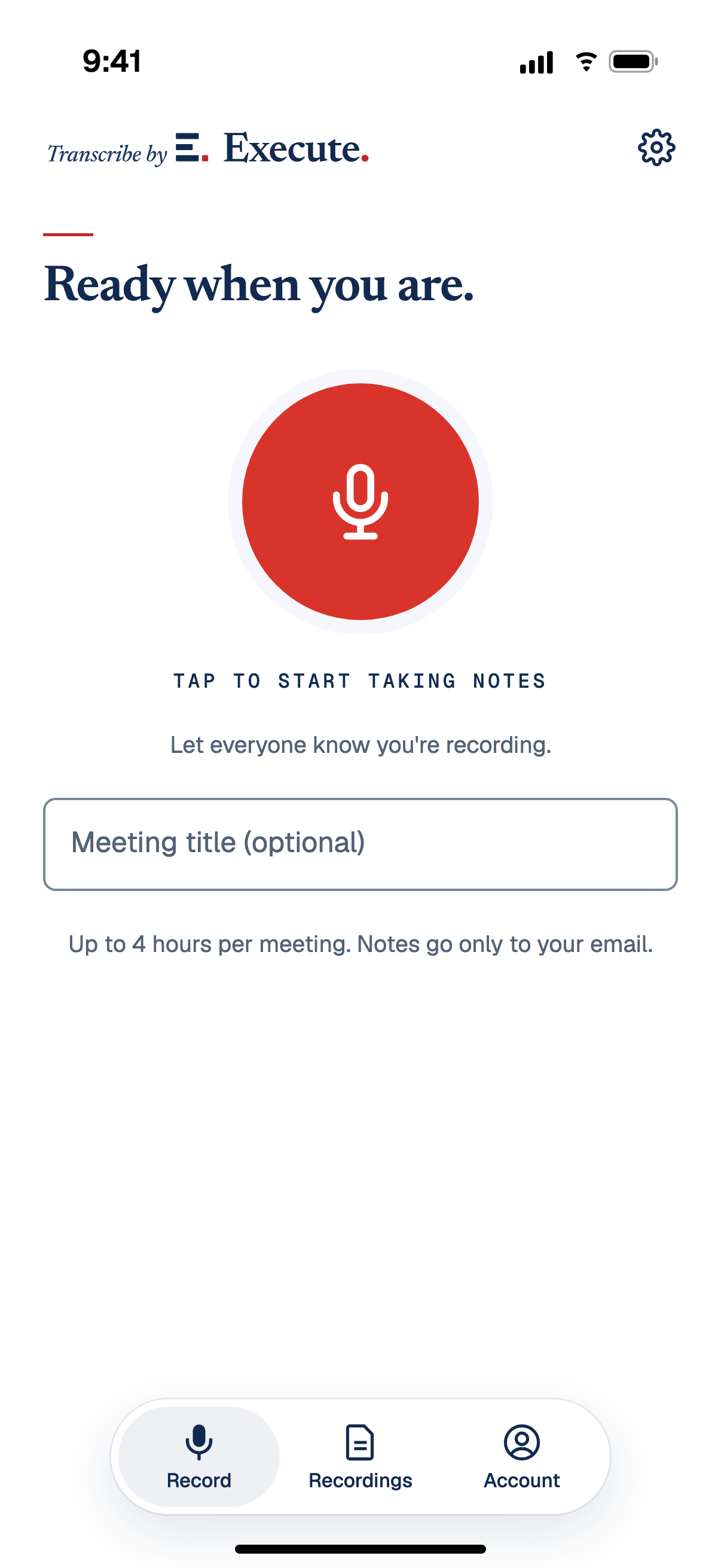
The Transcribe record screen: Ready when you are, a red record button, and Tap to start taking notes.
The app’s record screen and the notes email it sends, with sample data.

Client confidentiality

Before you record a client, know where the recording goes.

Some AI note takers reserve the right, in their own terms, to train their models on what they record. The New York City Bar’s Formal Opinion 2025-6 tells lawyers what to find out before using one with a client. These are its questions, with what Transcribe does about each.

Does the tool train AI on the recording?

No. Execute doesn’t, and neither does any service that handles your recording.

The transcription service has had model training switched off on our account since November 7, 2026, and the app deletes that service’s copy once your transcript is saved. The AI model that writes your notes does not keep the transcript by default.

Our account settings
Who can see it?

You. The notes and the transcript are emailed to the address you signed in with.

The app has no field for sending them to anyone else. Audio plays only inside the app while you are signed in, and it is never attached to an email. Execute staff look at an account only to fix a problem you report.

How it is built
Where is it kept, and for how long?

In your account for 12 months, or 30 days if you choose. After that it is deleted.

Transcript text is encrypted where we store it. You can download everything you have recorded at any time.

How it is built
Can you delete it?

Yes, from the app. Delete a recording and the audio, the transcript and the notes are removed from our storage.

One limit. Our hosting provider keeps database backups, so a deleted transcript can remain in a backup for up to 28 days before it ages out.

How it is built
Did the client agree to be recorded?

That part is yours, and the app reminds you the first time you record.

Nothing joins your call. The recorder is your own phone, in the room with you. How to ask for consent, and the state laws we checked

How it is built

Source: New York City Bar Association, Formal Opinion 2025-6, December 22, 2025. This is general information, not legal advice, and whether a tool fits your duties is your judgment. Our privacy and legal page names every service that handles a recording and what each one receives.

The best notes are
the ones you never had to take.

A client tells you the whole story once. Most of the day happens away from a desk, and your notes are whatever you remember that night.

Transcribe takes the notes for you. One tap to start, one to stop.

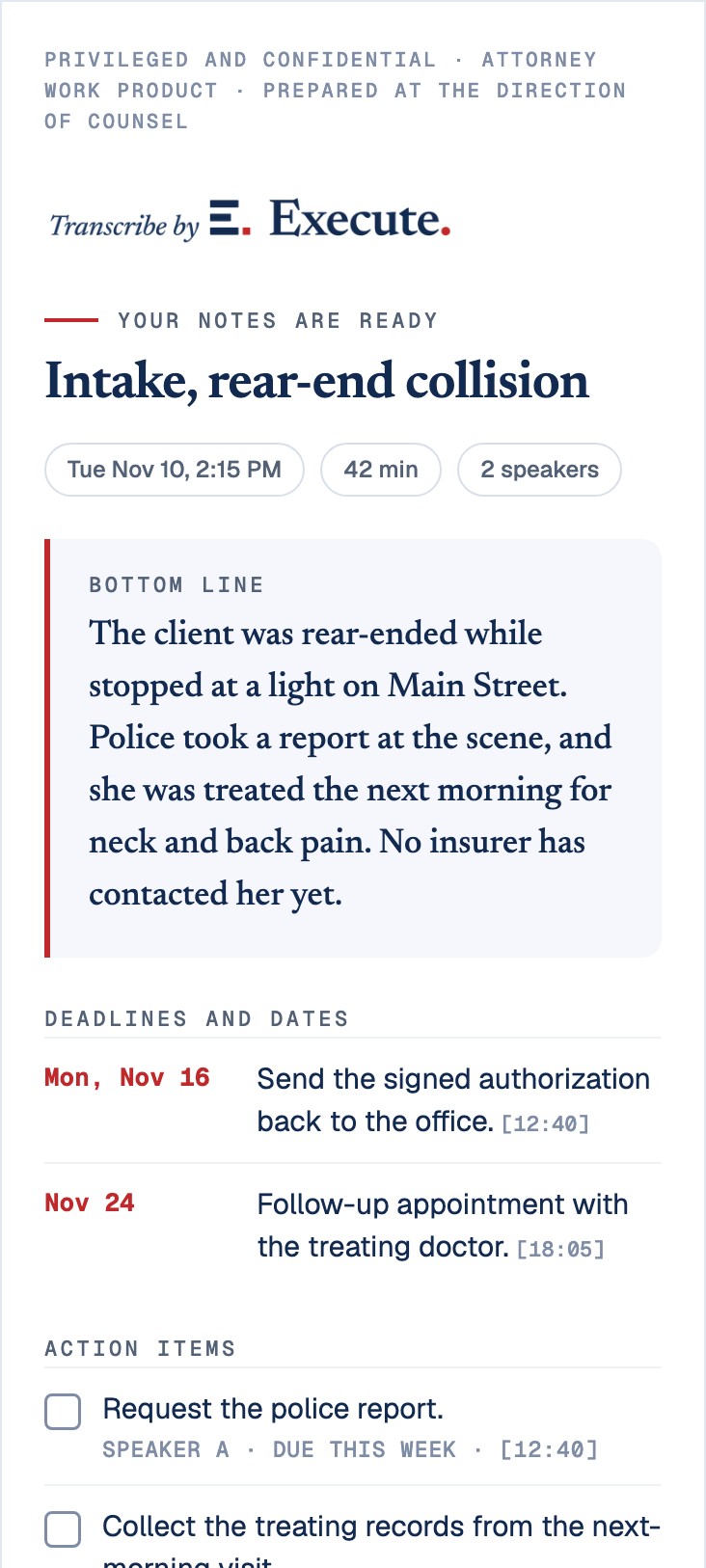
The notes email. Your notes are ready: Intake, rear-end collision. Tue Nov 10, 2:15 PM, 42 min, 2 speakers. Bottom line: the client was rear-ended while stopped at a light on Main Street; police took a report at the scene, and she was treated the next morning for neck and back pain; no insurer has contacted her yet. Deadlines and dates: Mon, Nov 16, send the signed authorization back to the office [12:40]; Nov 24, follow-up appointment with the treating doctor [18:05]. Action items: request the police report, Speaker A, due this week [12:40]; collect the treating records from the next-morning visit, Speaker A, due Nov 20 [18:05]; send photos of the vehicle damage, Jane Doe, due Friday [21:32]. Attached: the notes PDF and the transcript .txt. Button: Open in Transcribe.
On your phone a few minutes after you stop
  1. The bottom lineWhat happened, in a few sentences, at the top of the email.
  2. Deadlines and datesEach with its date and the moment in the recording it came from.
  3. Action itemsWho owes what, and by when.
  4. AttachedThe notes as a PDF and the full transcript, ready to file to the case.
The notes email, with sample data.

One button. Nothing to set up.

Sign in once with your email. After that the app is a single button, and the transcript always goes to the address you signed in with.

Tap to start taking notes

Demo only. Nothing is recorded, and your microphone is never used.

  1. Step 1

    Start note taking

    Tap the button when the meeting starts. Say out loud that you're recording.

  2. Step 2

    Stop when it ends

    Tap again when it ends. There is nothing to name or upload.

  3. Step 3

    Your notes are in your inbox

    Your notes and the full transcript arrive by email, ready to file to the case.

What’s emailed to you. Your meeting transcript, and an AI summary of the meeting.

Every line of the transcript carries a timestamp, and every deadline and action item in the notes points back to the moment it was said.

From
Transcribe by Execute <[email protected]>
To
[email protected]
Subject
Transcript: Intake, rear-end collision · Tue Nov 10, 2:15 PM (42 min)
Transcript 2026-11-10 1415.txt Notes 2026-11-10 1415.pdf
The notes email. Your notes are ready: Intake, rear-end collision. Tue Nov 10, 2:15 PM, 42 min, 2 speakers. Bottom line: the client was rear-ended while stopped at a light on Main Street; police took a report at the scene, and she was treated the next morning for neck and back pain; no insurer has contacted her yet. Deadlines and dates: Mon, Nov 16, send the signed authorization back to the office [12:40]; Nov 24, follow-up appointment with the treating doctor [18:05]. Action items: request the police report, Speaker A, due this week [12:40]; collect the treating records from the next-morning visit, Speaker A, due Nov 20 [18:05]; send photos of the vehicle damage, Jane Doe, due Friday [21:32]. Attached: the notes PDF and the transcript .txt. Button: Open in Transcribe.
Transcript 2026-11-10 1415.txtThe attached transcript, first minute
Nov 10, 202642 minutes
  1. Speaker A: Thank you. Tell me what happened that afternoon.
  2. Speaker B: I was stopped at the light on Main Street, around five thirty. A delivery truck hit me from behind. The driver said his company would call me.
  3. Speaker A: Did you see the company's name?
  4. Speaker B: ABC Logistics. It was on the side of the truck. The police came and wrote a report.
  5. Speaker A: Did you go to the hospital that day?
  6. Speaker B: The next morning. My neck and my lower back were stiff, and they told me to see an orthopedist.
  7. Speaker A: Has anyone from an insurance company called you?
  8. Speaker B: No. Nobody yet.
  • Consent, in the transcriptThe first lines of the transcript show you asked and the client agreed, at 00:04 and 00:11.
  • Every speaker labeledSpeaker A and Speaker B, so you can see who said what.
  • Every note has a timestampEach action item points to the moment it was said, so you can find it in the transcript in seconds.
  • Check it before you rely on itSpeech recognition can mishear names and numbers. Read the disclaimer.

Wherever the conversation happens.

Your phone is already in the room. That's the whole setup.

  • In person

    At your office, or over coffee near the courthouse.

  • On a call

    Put the call on speaker on your desk phone or another phone, then record it on your iPhone. An iPhone cannot record a call taken on that same iPhone.

  • At the bedside

    A hospital visit, when there is nowhere to set down a legal pad.

  • At the scene

    A witness's account at the corner where it happened, while it's still fresh.

Made by Execute

Transcribe is free, and it works on its own. It works even better with Execute

Execute is a digital paralegal for litigation firms, a separate subscription for the firm. On Execute, every meeting is saved to the right case file automatically, and the work it calls for starts right then: the retainer and HIPAA authorizations drafted for signature, every record requested and chased, every deadline on the calendar. You approve everything before it goes out.

Execute One digital paralegal. Every case at once. You approve. We execute. See what Execute does at execute.law

The same meeting, two ways.

Take the intake from the sample email. Here is what each one leaves you with.

Intake, rear-end collision · 42 min

TranscribeFree app

You get the notes. The work is still yours.

  • File the notes to the Jane Doe caseYou do it
  • Send the retainer and HIPAA authorizationsYou do it
  • Request the treating doctor’s recordsYou do it

A good to-do list, in your inbox.

Transcribe with For your firm

Execute does the work. You just approve it.

  • File the notes to the Jane Doe caseSaved automatically
  • Send the retainer and HIPAA authorizationsDrafted, out for signature once you approve
  • Request the treating doctor’s recordsRequested once she signs, then chased

Drafted in your firm’s own templates. Nothing goes out until you approve it.

An illustration using the sample meeting. Transcribe is free on its own; Execute is a separate subscription for your firm.

After the meeting, Execute keeps the case moving.

  • Your firm’s work never trains other firms’ systems
  • Your case management system remains the system of record
  • Nothing filed or sent without attorney sign off

The work of as many paralegals as you need, at half the cost of one hire.*

*Pricing depends on firm size and the products included in your subscription.

See it work your own cases.

Book a 30 minute video demo, and we’ll show Execute on the kind of cases you handle. Pick a time that works for you.

Book a 30 minute demo

Prefer to talk? Call 212 206 2520.

Rather we reach out? Leave your email and we reply within one business day.

Questions lawyers ask first.

What is Transcribe by Execute?

Transcribe by Execute is a free AI note taker for lawyers, on iPhone. Tap record when a meeting starts. A few minutes after you stop, the notes arrive by email: the bottom line, the deadlines and the action items, with the full transcript attached and each speaker labeled. It works for in-person meetings and for calls on speaker. Nothing joins your call.

Is it free?

Yes. It's free because it's how lawyers meet Execute. We never sell your recordings or use them to train AI, and we don't let anyone else train AI on them. Transcribe is free today. If we ever start charging for something you use, we'll email you at least 30 days before it changes, and everything you've recorded stays yours to download.

Are there limits?

Each recording can run up to 4 hours, and you can make up to 50 recordings in any 24 hours. There is no monthly limit.

Who can hear my recordings?

Only you, signed in to your own account. To make the transcript, the audio goes to a transcription service, and the text goes to an AI model that writes the summary. Our privacy and legal page names each service and what it receives.

Does a recording stay privileged?

That depends on you following the rules for maintaining privilege, and no app can do that for you. Here is our part. We never sell your recordings or notes, and we never hand them to anyone outside the services that run the app, which are listed on our privacy and legal page. No one at Execute reads your transcript unless you ask us for help with it.

Where does the email come from?

From Transcribe by Execute, at [email protected]. Add that address to your contacts so the transcript doesn't land in spam. If you reply, the reply goes to [email protected].

Do I need consent to record?

Often, and in some states from everyone in the conversation. The safest habit is to ask at the start, on the recording, and let each person answer. The app reminds you the first time you record. Our privacy and legal page explains one party and all party consent and lists the statutes we checked. It is general information, not legal advice.

What phones does it work on?

iPhone first, through the App Store. Leave your email and we'll tell you the day it's available.

Who makes Transcribe?

Execute, the company behind the digital paralegal for litigation firms. Execute was founded by James Rubinowitz, a New York trial lawyer who teaches AI and litigation at the Benjamin N. Cardozo School of Law.

Does it work without Execute?

Yes. Any lawyer can use it on its own, free. Firms on Execute also get each transcript saved to the right case, with the work the meeting calls for drafted for the lawyer's approval.

Can I rely on the transcript as written?

Check it first. Speech recognition makes mistakes, most often with names and with people talking over each other. Treat the transcript as your notes, and never present it as a certified transcript.

Is Transcribe HIPAA compliant?

Not yet, and we are working toward it. Today the service that sends your notes by email does not sign the agreement HIPAA requires of vendors, so we do not offer Transcribe as a HIPAA compliant service. When that changes, this answer will change. Our privacy and legal page lists every service that handles your recordings.

Focus on your meeting. Your notes will be waiting.

Leave your email and we'll tell you the day Transcribe is in the App Store.

One email at launch. Privacy and legal